
Actor Inspector Agent
Agent Actor Inspector 🕵️♂️: An Apify Actor that rates others on docs 📝, inputs 🔍, code 💻, functionality ⚙️, performance ⏱️, and uniqueness 🌟. Config with actorId array, run, and review results. Helps devs improve, ensures quality, and guides users.


The Actor Inspector Agent is designed to evaluate and analyze other Apify Actors. It provides detailed reports on code quality, documentation, uniqueness, and pricing competitiveness, helping developers optimize their Actors and users choose the best tools for their needs.
This Agent is built using CrewAI and Apify SDK and is using modern and flexible pricing model for AI Agents Pay Per Event.
🎯 Features
- 🧪 Code quality: Evaluates tests, linting, security, performance, and code style
- 📚 Documentation: Reviews readme clarity, input schema, examples, and GitHub presence
- 💫 Uniqueness: Compares features with similar Actors to assess distinctiveness
- 💰 Pricing: Analyzes price competitiveness and model transparency
- 🚧 Actor run (Coming soon): Tests Actor execution and generates performance report
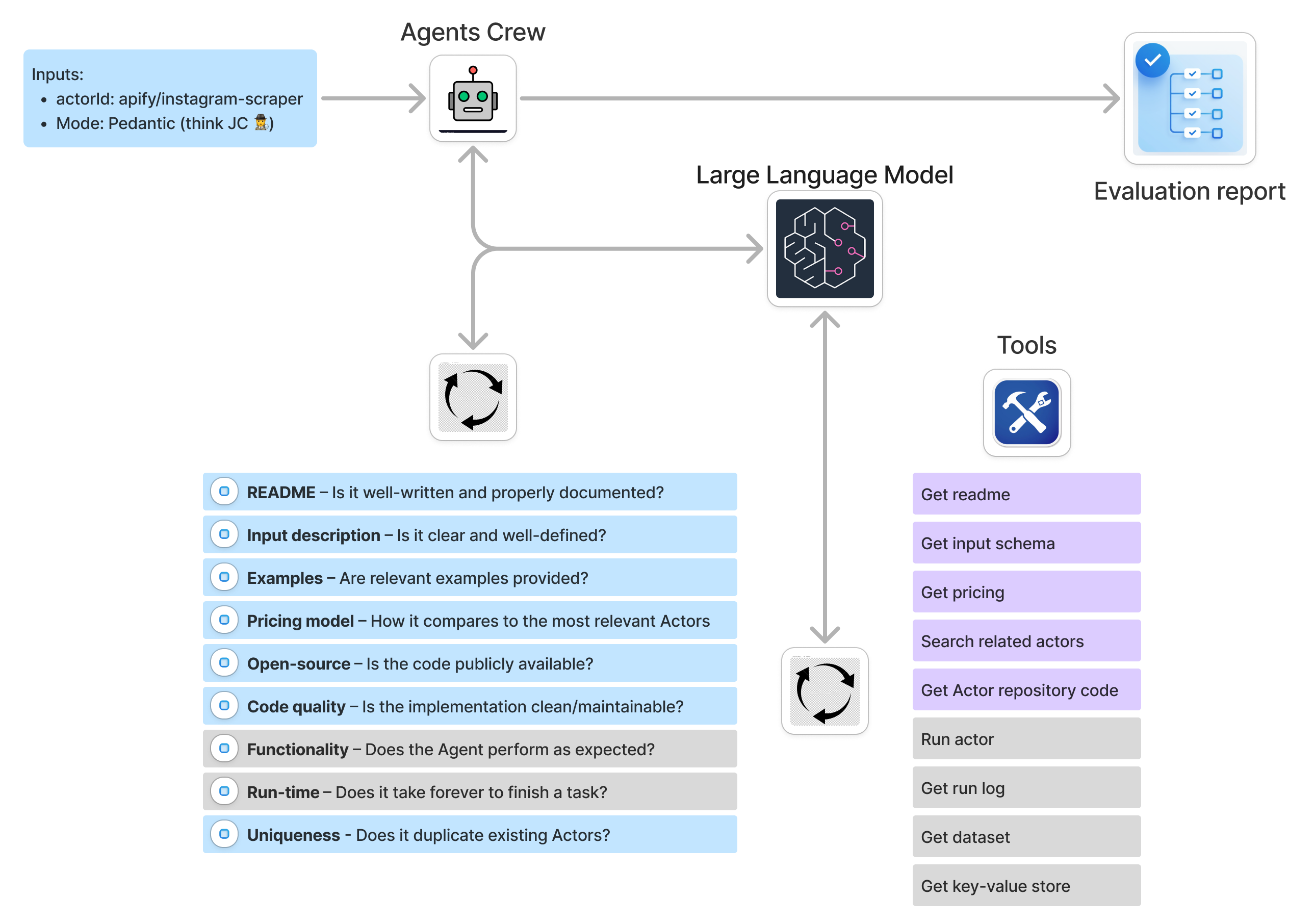
🔄 How it works?
-
📥 Input
- Actor name (e.g.,
apify/instagram-scraper) - AI model selection (
gpt-4o,gpt-4o-mini,o3-mini) - Optional debug mode
- Actor name (e.g.,
-
🤖 Processing with CrewAI
- Uses specialized AI agents working as a team:
- Code quality specialist: Reviews source code and tests
- Documentation expert: Analyzes readme and input schema
- Apify Store analyst: Evaluates pricing and uniqueness
- Each agent focuses on their expertise while collaborating for comprehensive analysis
- Uses specialized AI agents working as a team:
-
📤 Output
- Generates detailed markdown report
- Includes ratings and suggestions for each category
- Automatically saves to Apify dataset
💰 Pricing
This Actor uses the Pay Per Event (PPE) model for flexible, usage-based pricing. It currently charges for Actor start and a flat fee per task completion.
| Event | Price (USD) |
|---|---|
| Actor start | $0.05 |
| Task Completion | $0.95 |
Input Example
1{
2  "actorName": "apify/instagram-scraper",
3  "modelName": "gpt-4o-mini",
4  "debug": false
5}
Output Example
A sample report might look like this (stored in the dataset):
1**Final Overall Inspection Report for Apify Actor: apify/website-content-crawler**
2
3- **Code quality:**
4  - Rating: Unknown (Based on best practices).
5  - Description: While direct analysis was unavailable, the Actor is expected to follow best practices, ensuring organized, efficient, and secure code.
6
7- **Actor quality:**
8  - Rating: Great
9  - Description: The Actor exhibits excellent documentation, with comprehensive guidance, use case examples, detailed input properties, and a user-friendly design that aligns with best practices.
10
11- **Actor uniqueness:**
12  - Rating: Good
13  - Description: Although there are similar Actors, its unique design for LLM integration and enhanced HTML processing options provide it with a distinct niche.
14
15- **Pricing:**
16  - Rating: Good
17  - Description: The flexible PAY_PER_PLATFORM_USAGE model offers potential cost-effectiveness, particularly for large-scale operations, compared to fixed models.
18
19**Overall Final Mark: Great**
20
21The "apify/website-content-crawler" stands out with its combination of quality documentation, unique features tailored for modern AI applications, and competitive pricing strategy, earning it a "Great" overall assessment. While information on code quality couldn't be directly assessed, the Actor's thought-out documentation and broad feature set suggest adherence to high standards.
Dataset output:
1{
2  "actorId": "apify/website-content-crawler",
3  "response": "...markdown report content..."
4}
✨ Why Use Agent Actor Inspector?
- Developer insights: Identify areas to improve your Actor’s code, docs, or pricing.
- User decision-making: Compare Actors to find the best fit for your needs.
- Automation: Streamlines Actor evaluation with AI-driven analysis.
- Scalability: Analyze multiple Actors by running the Inspector in parallel.
🔧 Technical highlights
- Built with Apify SDK: Ensures seamless integration with the Apify platform.
- CrewAI powered: Uses multi-agent workflows for thorough, modular analysis.
- GitHub integration: Pulls source code from GitHub when available for deeper code quality checks.
- Flexible tools: Tools to fetch README, input schemas, pricing information, and related Actors.
🤖 Under the hood with CrewAI
This Actor uses CrewAI to orchestrate a team of specialized AI agents that work together to analyze Apify Actors:
👥 The crew
-
Code quality specialist
1goal = 'Deliver precise evaluation of code quality, focusing on tests, linting, code smells, security, performance, and style' 2tools = [...] # Fetches and analyzes source code -
Documentation expert
1goal = 'Evaluate documentation completeness, clarity, and usefulness for potential users' 2tools = [...] # Analyzes readme and input schema -
Pricing expert
1goal = 'Analyze pricing with respect to other Actors'
2tools = [...]  # Analyzes competition
🔄 Workflow
-
The main process creates a crew of agents, each with:
- Specific role and expertise
- Defined goal and backstory
- Access to relevant tools
- Selected LLM model
-
Agents work sequentially to:
- Gather required information using their tools
- Analyze data within their domain
- Provide structured evaluations
- Pass insights to other agents when needed
-
Results are combined into a comprehensive markdown report with:
- Detailed analysis per category
- Clear ratings (great/good/bad)
- Actionable improvement suggestions
🛠️ Tools
Each agent has access to specialized tools that:
- Fetch Actor source code and analyze its structure
- Retrieve documentation and readme content
- Get pricing information and find similar Actors
- Process and structure the gathered data
The CrewAI framework ensures collaboration between agents while maintaining focus on their specific areas of expertise.
📖 Learn more
- Apify Platform
- Apify SDK Documentation
- CrewAI Documentation
- What are AI Agents?
- AI agent architecture
- How to build an AI agent on Apify
🚀 Get started
Evaluate your favorite Apify Actors today and unlock insights to build or choose better tools! 🤖🔍
🌐 Open source
This Actor is open source, hosted on GitHub.
Are you missing any features? Open an issue here or create a pull request.
Frequently Asked Questions
Is it legal to scrape job listings or public data?
Yes, if you're scraping publicly available data for personal or internal use. Always review Websute's Terms of Service before large-scale use or redistribution.
Do I need to code to use this scraper?
No. This is a no-code tool — just enter a job title, location, and run the scraper directly from your dashboard or Apify actor page.
What data does it extract?
It extracts job titles, companies, salaries (if available), descriptions, locations, and post dates. You can export all of it to Excel or JSON.
Can I scrape multiple pages or filter by location?
Yes, you can scrape multiple pages and refine by job title, location, keyword, or more depending on the input settings you use.
How do I get started?
You can use the Try Now button on this page to go to the scraper. You’ll be guided to input a search term and get structured results. No setup needed!