
Booking Airport Taxis Scraper
Simplify your search for airport taxi services with our Booking Airport Taxis Scraper. Easily compare prices, services, and car types to find the best option for your needs.
What is Booking Airport Taxis Scraper?
Booking Airport Taxis Scraper is a tool designed to help you locate airport taxi services listed on Booking.com. This scraper empowers you to effortlessly search for taxi services tailored to your specified pick-up and drop-off locations, along with your desired date and time.
What information can I extract?
With this scraper, you can extract detailed information about available taxi services, including:
Pick-up and Drop-off Locations
| Field | Description |
|---|---|
| 🚖 Name | Name of the location |
| 🏠 Address | Address of the location |
| 🌆 City | City where the location is situated |
| 🌍 Country | Country where the location is situated |
| 📍 Other Details | Additional details about the location |
Taxi Service Details
| Field | Description |
|---|---|
| 🚕 Supplier Information | Details about the taxi service supplier |
| 📅 Predicted Pick-up Date | Predicted date when the taxi will pick the passenger up |
| 🕰 Predicted Pick-up Time | Predicted time when the taxi will pick the passenger up |
| 🛄 Bags Allowance | The number of bags allowed |
| 🤝 Meet and Greet Service | Indicates if meet and greet service is available |
| 🛣 Driving Distance | Distance in kilometers from pick-up to drop-off location |
| ⏳ Duration | Duration of the taxi journey in minutes |
| 🚖 Maximum Passengers | Maximum number of passengers the taxi can accommodate |
| 💰 Price | Price of the taxi service |
| 💱 Currency | Currency in which the price is displayed |
| 🔄 Cancellation Policies | Policies regarding cancellation of the taxi service booking |
Taxi Car Details
| Field | Description |
|---|---|
| 🚗 Model | Model of the taxi car |
| 📝 Description | Description of the car (such as Standard, Executive, Minibus etc.) |
| 🖼 Image | Image of the taxi model |
Why use Booking Airport Taxis Scraper?
🚖 Conveniently search for airport taxi services available on Booking.com.
💼 Compare prices, services, and car types from different suppliers.
💰 Save time and effort by automating the process of searching airport taxis.
How do I use Booking Airport Taxis Scraper?
Booking Airport Taxis Scraper is easy to use, even if you're new to web scraping. Here's how you can scrape airport taxi services with this tool:
- Sign up for a free Apify account using your email.
- Open Booking Airport Taxis Scraper.
- Enter the pick-up and drop-off locations, pick-up date and time.
- Click
Startand wait for the data to be extracted. - Download your taxi service information in JSON, XML, CSV, Excel, or HTML format.
Input
The input for Booking Airport Taxis Scraper includes the following parameters:
- Pick-up Location: Name of the location where the taxi will pick the passenger up.
- Drop-off Location: Name of the location where the taxi will drop the passenger off.
- Pick-up Date: Date when the taxi will pick the passenger up (format:
yyyy-mm-dd). - Pick-up Time: Time when the taxi will pick the passenger up (format:
hh:mm). - Number of Passengers: Number of passengers that will be taking the taxi.
- Currency: Currency in which taxi prices will be displayed.
Output sample
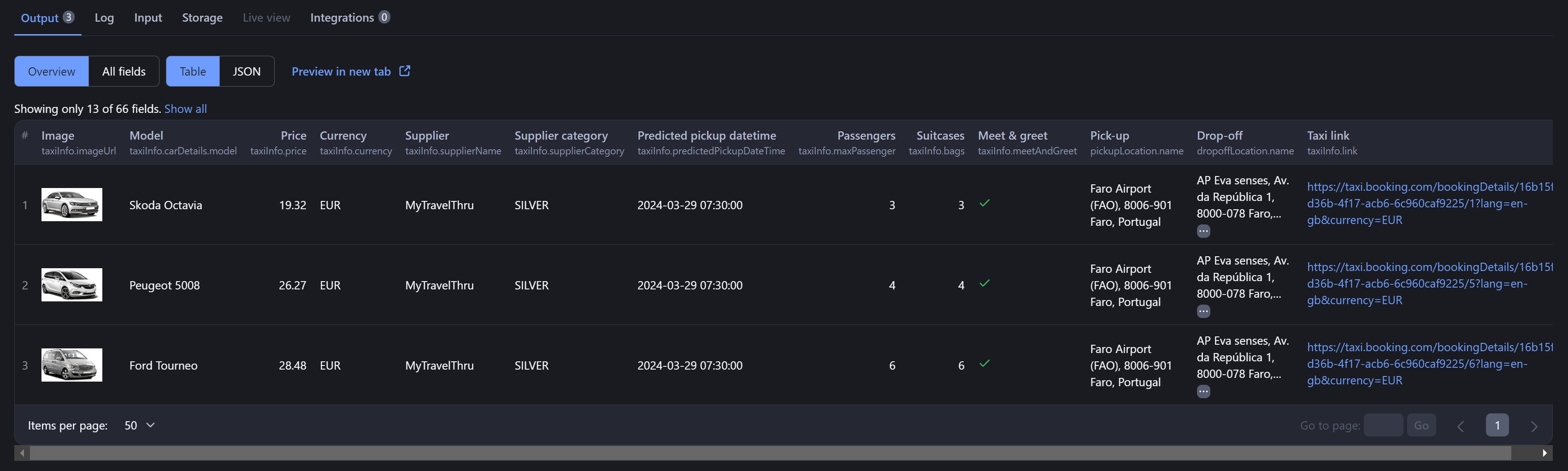
The results will be provided in a structured format, including detailed information about the taxi service, pick-up and drop-off locations, and car details. Here's an example of the output for a particular taxi journey:
And more detailed JSON output:
1[{ 2 "pickupLocation": { 3 "locationId": "ChIJm5mnTbBSBQ0RRztnYx5VRCE", 4 "name": "Faro Airport (FAO), 8006-901 Faro, Portugal", 5 "postcode": "8006-901", 6 "city": "Faro", 7 "country": "PT", 8 "timezone": "Europe/Lisbon", 9 "latLng": { 10 "latitude": 37.017547, 11 "longitude": -7.969795 12 }, 13 "airportCode": "FAO", 14 "establishment": "Faro Airport (FAO)", 15 "locationType": "AIRPORT", 16 "description": "8006-901 Faro, Portugal" 17 }, 18 "dropoffLocation": { 19 "locationId": "ChIJPZPNOsdSBQ0R_Pd2ZjY5y_M", 20 "name": "AP Eva senses, Av. da República 1, 8000-078 Faro, Portugal", 21 "postcode": "8000-078", 22 "city": "Faro", 23 "country": "PT", 24 "latLng": { 25 "latitude": 37.0167356, 26 "longitude": -7.9366786 27 }, 28 "establishment": "AP Eva senses", 29 "airportCode": null, 30 "locationType": "GEO", 31 "description": "Av. da República 1, 8000-078 Faro, Portugal" 32 }, 33 "taxiInfo": { 34 "resultReference": "6", 35 "supplierID": 1279, 36 "supplierLocationID": 6313, 37 "predictedPickupDateTime": "2024-03-29 07:30:00.000", 38 "bags": 6, 39 "meetAndGreet": true, 40 "publicTransport": false, 41 "imageUrl": "https://cdn.rideways.com/images/cars/large-people-carrier.jpg", 42 "drivingDistance": 6.71, 43 "duration": 11, 44 "maxPassenger": "6", 45 "originalPrice": null, 46 "price": 28.48, 47 "currency": "EUR", 48 "hourFrom": "00:00", 49 "hourUntil": "24:00", 50 "frequencyMins": null, 51 "twentyFourHourCancellation": true, 52 "twoHourCancellation": false, 53 "nonRefundable": false, 54 "type": "CAR", 55 "carDetails": { 56 "model": "Ford Tourneo", 57 "modelDescription": "Ford Tourneo or similar", 58 "description": "Large People Carrier" 59 }, 60 "link": "https://taxi.booking.com/bookingDetails/16b15fbd-d36b-4f17-acb6-6c960caf9225/6?lang=en-gb¤cy=EUR", 61 "supplierCategory": "SILVER", 62 "supplierName": "MyTravelThru", 63 "cancellationLeadTimeMinutes": 1440, 64 "priceRuleID": 18677, 65 "priceDiscountPercentage": 0 66 } 67}, 68{ 69 "pickupLocation": { 70 "locationId": "ChIJm5mnTbBSBQ0RRztnYx5VRCE", 71 "name": "Faro Airport (FAO), 8006-901 Faro, Portugal", 72 "postcode": "8006-901", 73 "city": "Faro", 74 "country": "PT", 75 "timezone": "Europe/Lisbon", 76 "latLng": { 77 "latitude": 37.017547, 78 "longitude": -7.969795 79 }, 80 "airportCode": "FAO", 81 "establishment": "Faro Airport (FAO)", 82 "locationType": "AIRPORT", 83 "description": "8006-901 Faro, Portugal" 84 }, 85 "dropoffLocation": { 86 "locationId": "ChIJPZPNOsdSBQ0R_Pd2ZjY5y_M", 87 "name": "AP Eva senses, Av. da República 1, 8000-078 Faro, Portugal", 88 "postcode": "8000-078", 89 "city": "Faro", 90 "country": "PT", 91 "latLng": { 92 "latitude": 37.0167356, 93 "longitude": -7.9366786 94 }, 95 "establishment": "AP Eva senses", 96 "airportCode": null, 97 "locationType": "GEO", 98 "description": "Av. da República 1, 8000-078 Faro, Portugal" 99 }, 100 "taxiInfo": { 101 "resultReference": "5", 102 "supplierID": 1279, 103 "supplierLocationID": 6313, 104 "predictedPickupDateTime": "2024-03-29 07:30:00.000", 105 "bags": 4, 106 "meetAndGreet": true, 107 "publicTransport": false, 108 "imageUrl": "https://cdn.rideways.com/images/cars/people-carrier.jpg", 109 "drivingDistance": 6.71, 110 "duration": 11, 111 "maxPassenger": "4", 112 "originalPrice": null, 113 "price": 26.27, 114 "currency": "EUR", 115 "hourFrom": "00:00", 116 "hourUntil": "24:00", 117 "frequencyMins": null, 118 "twentyFourHourCancellation": true, 119 "twoHourCancellation": false, 120 "nonRefundable": false, 121 "type": "CAR", 122 "carDetails": { 123 "model": "Peugeot 5008", 124 "modelDescription": "Peugeot 5008 or similar", 125 "description": "People Carrier" 126 }, 127 "link": "https://taxi.booking.com/bookingDetails/16b15fbd-d36b-4f17-acb6-6c960caf9225/5?lang=en-gb¤cy=EUR", 128 "supplierCategory": "SILVER", 129 "supplierName": "MyTravelThru", 130 "cancellationLeadTimeMinutes": 1440, 131 "priceRuleID": 18676, 132 "priceDiscountPercentage": 0 133 } 134}, 135{ 136 "pickupLocation": { 137 "locationId": "ChIJm5mnTbBSBQ0RRztnYx5VRCE", 138 "name": "Faro Airport (FAO), 8006-901 Faro, Portugal", 139 "postcode": "8006-901", 140 "city": "Faro", 141 "country": "PT", 142 "timezone": "Europe/Lisbon", 143 "latLng": { 144 "latitude": 37.017547, 145 "longitude": -7.969795 146 }, 147 "airportCode": "FAO", 148 "establishment": "Faro Airport (FAO)", 149 "locationType": "AIRPORT", 150 "description": "8006-901 Faro, Portugal" 151 }, 152 "dropoffLocation": { 153 "locationId": "ChIJPZPNOsdSBQ0R_Pd2ZjY5y_M", 154 "name": "AP Eva senses, Av. da República 1, 8000-078 Faro, Portugal", 155 "postcode": "8000-078", 156 "city": "Faro", 157 "country": "PT", 158 "latLng": { 159 "latitude": 37.0167356, 160 "longitude": -7.9366786 161 }, 162 "establishment": "AP Eva senses", 163 "airportCode": null, 164 "locationType": "GEO", 165 "description": "Av. da República 1, 8000-078 Faro, Portugal" 166 }, 167 "taxiInfo": { 168 "resultReference": "1", 169 "supplierID": 1279, 170 "supplierLocationID": 6313, 171 "predictedPickupDateTime": "2024-03-29 07:30:00.000", 172 "bags": 3, 173 "meetAndGreet": true, 174 "publicTransport": false, 175 "imageUrl": "https://cdn.rideways.com/images/cars/standard.jpg", 176 "drivingDistance": 6.71, 177 "duration": 11, 178 "maxPassenger": "3", 179 "originalPrice": null, 180 "price": 19.32, 181 "currency": "EUR", 182 "hourFrom": "00:00", 183 "hourUntil": "24:00", 184 "frequencyMins": null, 185 "twentyFourHourCancellation": true, 186 "twoHourCancellation": false, 187 "nonRefundable": false, 188 "type": "CAR", 189 "carDetails": { 190 "model": "Skoda Octavia", 191 "modelDescription": "Skoda Octavia or similar", 192 "description": "Standard" 193 }, 194 "link": "https://taxi.booking.com/bookingDetails/16b15fbd-d36b-4f17-acb6-6c960caf9225/1?lang=en-gb¤cy=EUR", 195 "supplierCategory": "SILVER", 196 "supplierName": "MyTravelThru", 197 "cancellationLeadTimeMinutes": 1440, 198 "priceRuleID": 18672, 199 "priceDiscountPercentage": 0 200 } 201}]
Want to scrape other travel industry data?
You can use the dedicated scrapers below if you want to scrape specific travel industry data. Each of them is built particularly for the relevant scraping case be it restaurant reviews, flight prices, or whole accommodations. Feel free to browse them:
Integrations and Booking Airport Taxis Scraper
Booking Airport Taxis Scraper can be connected with almost any cloud service or web app thanks to integrations on the Apify platform. You can *integrate with LangChain, Make, Trello, Zapier, Slack, Airbyte, GitHub, Google Sheets, Google Drive*, *Asana,* and more.
You can also use webhooks to carry out an action whenever an event occurs, e.g., get a notification whenever Booking Airport Taxis Scraper successfully finishes a run.
Using Booking Airport Taxis Scraper with the Apify API
The Apify API gives you programmatic access to the Apify platform. The API is organized around RESTful HTTP endpoints that enable you to manage, schedule, and run Apify Actors. The API also lets you access any datasets, monitor Actor performance, fetch results, create and update versions, and more. To access the API using Node.js, use the apify-client NPM package. To access the API using Python, use the apify-client PyPI package.
Check out the Apify API reference docs for full details or click on the API tab for code examples.
Is it legal to scrape airport taxi data from Booking.com?
Our travel industry scrapers, including Booking Airport Taxis Scraper, are designed to extract publicly available data from Booking.com without violating any legal or ethical standards. However, you should always ensure that your use of scraped data complies with Booking.com's terms of service and applicable laws and regulations.
Your feedback
We’re always working on improving the performance of our Actors. So if you’ve got any technical feedback for Booking Airport Taxis Scraper or simply found a bug, please create an issue on the Actor’s Issues tab in Apify Console.
Frequently Asked Questions
Is it legal to scrape job listings or public data?
Yes, if you're scraping publicly available data for personal or internal use. Always review Websute's Terms of Service before large-scale use or redistribution.
Do I need to code to use this scraper?
No. This is a no-code tool — just enter a job title, location, and run the scraper directly from your dashboard or Apify actor page.
What data does it extract?
It extracts job titles, companies, salaries (if available), descriptions, locations, and post dates. You can export all of it to Excel or JSON.
Can I scrape multiple pages or filter by location?
Yes, you can scrape multiple pages and refine by job title, location, keyword, or more depending on the input settings you use.
How do I get started?
You can use the Try Now button on this page to go to the scraper. You’ll be guided to input a search term and get structured results. No setup needed!