
🤝 Partnership Strategy Builder
Build your business partnership strategy with AI! Generates comprehensive, customized partnership strategies covering partner identification, compatibility evaluation, outreach methods, and negotiation approaches. Perfect for businesses seeking strategic alliances and growth opportunities. 🤝
Transform your business development process with AI-powered partnership strategies! This sophisticated tool helps you create detailed, actionable plans for identifying and approaching potential business partners, complete with evaluation criteria and negotiation frameworks.
Two versions for choice:
| Pay Model | Pricing |
|---|---|
| Rental | $29.99/month(no limit) |
| Pay-per-event | $3.99/event |
✨ Key Features
- 🎯 Customized partnership strategies based on your business profile
- 📊 Comprehensive partner evaluation frameworks
- 🤝 Professional outreach and negotiation guidelines
- 📈 Growth-focused partnership recommendations
- 📑 Multi-format strategy documentation (PDF, HTML, Markdown)
- 💼 Industry-specific insights and approaches
- 🔄 Adaptable to various business sizes and sectors
- 🌟 Value alignment assessment tools
💪 Why Choose This Actor?
- Time-Efficient: Generate comprehensive partnership strategies in minutes
- Professional: Expert-level guidance based on business development best practices
- Customizable: Tailored to your specific industry and business needs
- Multi-Format: Get your strategy in three different formats for easy sharing
- Strategic: Focus on long-term value and mutual growth opportunities
- Practical: Actionable steps and concrete recommendations
🎯 Perfect For
- 👔 Business Development Professionals
- 🏢 Startup Founders
- 💼 Corporate Strategy Teams
- 🤝 Partnership Managers
- 📈 Growth Strategists
- 🌐 International Business Developers
📈 Use Cases
- Market Expansion: Identify strategic partners for entering new markets
- Technology Integration: Find complementary tech partners
- Supply Chain Optimization: Develop supplier partnership strategies
- Distribution Network: Build strategies for channel partnerships
- Innovation Partnerships: Create frameworks for R&D collaborations
📝 Input Requirements
Provide key information about your business:
- Business description
- Industry and size
- Partnership goals
- Values and vision
- Required skills and resources
📊 Output
Receive comprehensive partnership strategy reports in three formats:
- HTML Report: Web-friendly format with structured content
- PDF Report: Professional document for presentations
- Markdown Report: Easily editable format for customization
Input Example
1{
2    "describeYourBusiness": "We develop interactive educational software for elementary schools.",
3    "industryAndSize": "Tech industry, small-sized startup",
4    "partnershipGoals": "To expand our market reach and enhance our product features through technological partnerships.",
5    "valuesAndVision": "Innovation in education, commitment to user-friendly design, and long-term educational impact.",
6    "skillsAndResourcesNeeded": "Advanced AI technology expertise and marketing reach in new geographical areas."
7}
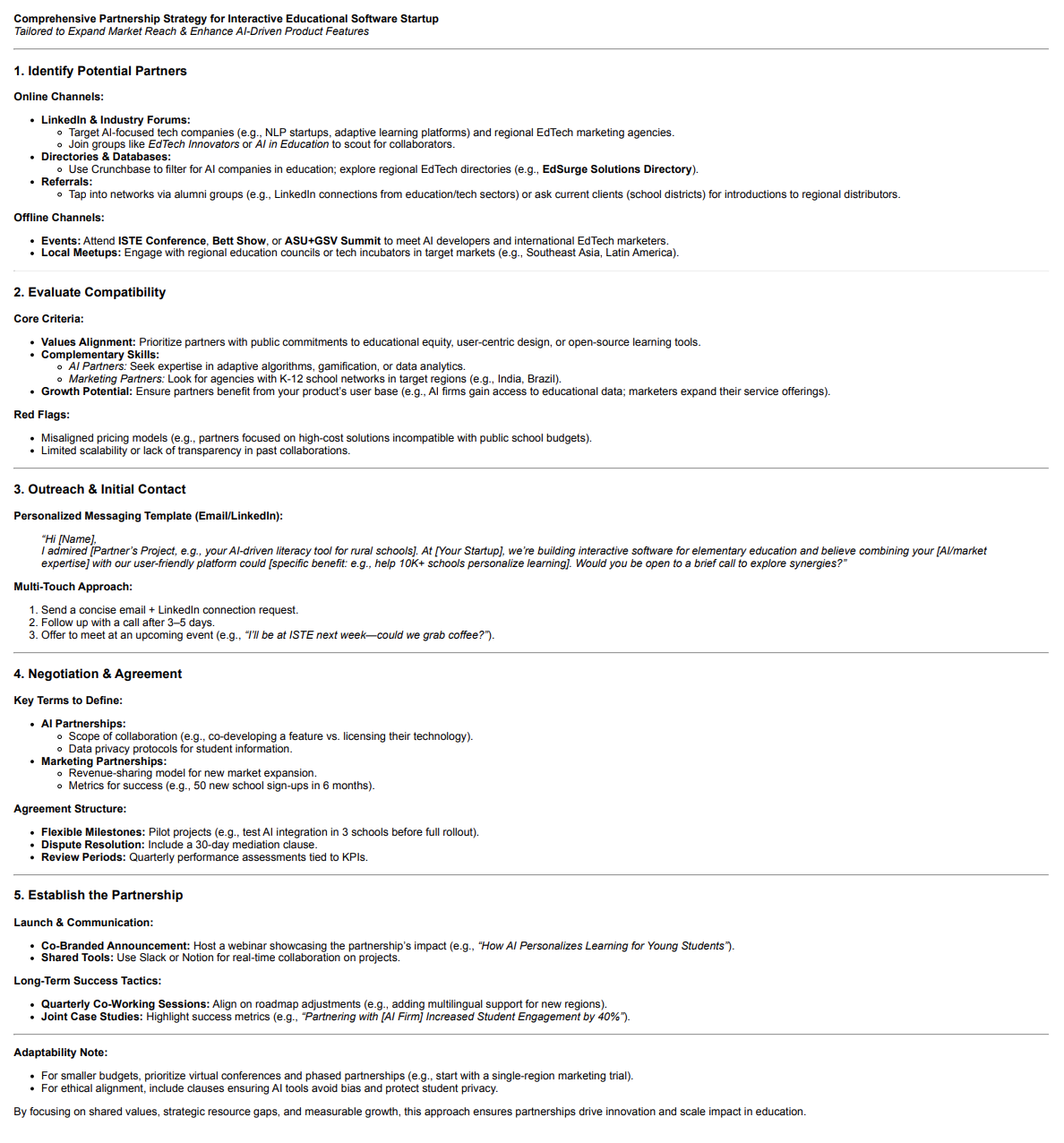
Example Screenshots
🔗 Related Actors You Might Like
- 🚀 AI Marketing Thread Generator - Transform business insights into engaging Twitter threads
- 🤖 AI Idea Generator - Transform creative challenges into innovative solutions
- 🎨 AI Art Generator - Generate stunning AI art with custom prompts
- 🔍 AI-powered Search - Transform search queries into structured summaries
- 📝 Article Content Extractor - Extract clean article content and metadata
- 🎯 Keyword Discovery Tool - Discover valuable search insights
- 🔍 Keyword Density Checker - Analyze webpage content for SEO
- 📱 Twitter Bio Generator - Generate unique Twitter bios with AI
- 🎨 AI Art Prompt Generator - Generate creative AI art prompts
- 📊 YouTube Video Statistics Scraper - Extract comprehensive video stats
- 🎯 YouTube Hashtag Generator - Generate relevant YouTube hashtags
- 📱 Facebook Posts Search Scraper - Extract posts from Facebook search
- 🔍 Reddit Trends Scraper - Extract trending posts and discussions
- 🎯 Social Media Hashtag Generator - Generate engaging hashtags for social media
- 📊 Twitter Trending Topics Scraper - Monitor Twitter trends globally
Frequently Asked Questions
Is it legal to scrape job listings or public data?
Yes, if you're scraping publicly available data for personal or internal use. Always review Websute's Terms of Service before large-scale use or redistribution.
Do I need to code to use this scraper?
No. This is a no-code tool — just enter a job title, location, and run the scraper directly from your dashboard or Apify actor page.
What data does it extract?
It extracts job titles, companies, salaries (if available), descriptions, locations, and post dates. You can export all of it to Excel or JSON.
Can I scrape multiple pages or filter by location?
Yes, you can scrape multiple pages and refine by job title, location, keyword, or more depending on the input settings you use.
How do I get started?
You can use the Try Now button on this page to go to the scraper. You’ll be guided to input a search term and get structured results. No setup needed!